Nuncio Secrets fill
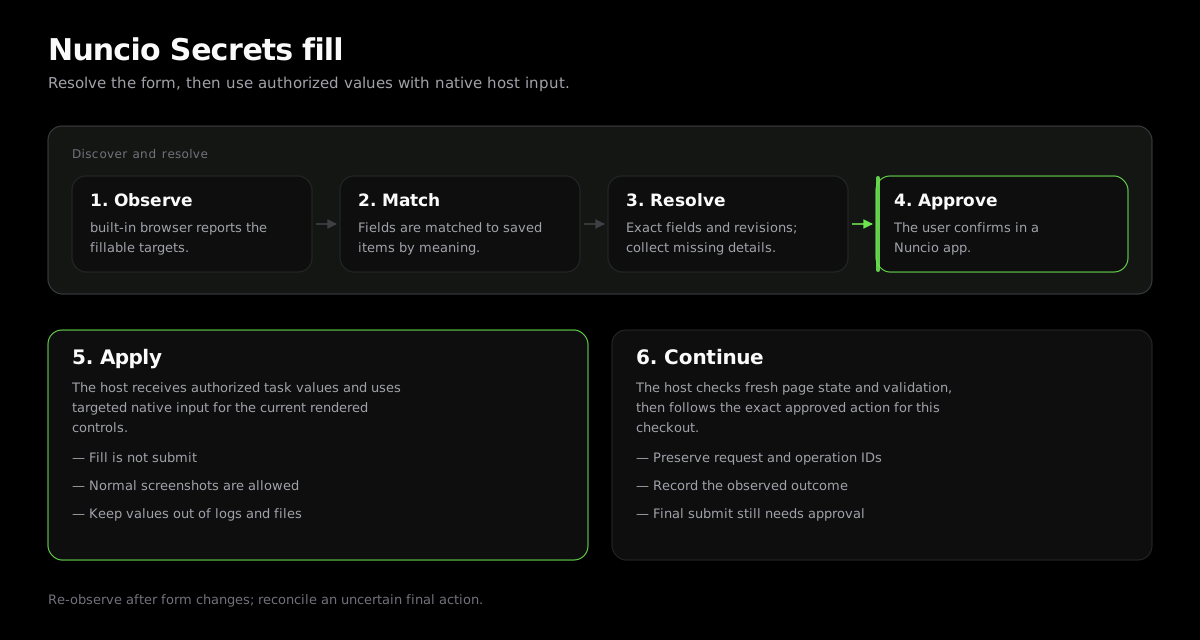
Nuncio supplies authorized values for the intended task. The host owns rendered-page understanding, native input, challenges and the exact final approved action.
- Discover current metadata and preserve the selected field revisions.
- Reuse suitable saved fields and collect only missing details through the secure request.
- Authorized values may be visible to the host and model for the intended task.
- Data use, Save and final submission require their own applicable authority.
Resolve The Intended Form
Inspect the rendered form and use the current get_secret_footprint, template discovery and resolve_browser_form_values schemas. Bind each field to the intended person and role, preserve suitable saved selections and collect only what is missing.
Continue The Same Request
Present the returned consent or secure collection request once. After its recorded decision, replay the original resolver identity and input as directed. Do not open a sibling request to bypass denial or a mapping error.
Screenshots And Fresh Observation
Normal screenshots support page understanding throughout the checkout, including after protected input. Re-observe after a country, payment-method or other form-revealing transition and discard stale targets. Do not export screenshots containing credentials.
Validate And Submit
Read labels, validation and totals normally. Secrets consent authorizes the intended data use, not form submission or payment. Use the exact final action only when that action and checkout are approved. After an unclear submission, observe and reconcile the same operation without another possible final click.